
To create a Metadata:
Step 1 - Access the "Metadata" tab in Settings  in the upper right corner of the screen;
Step 2 - Click Include metadata ;
;
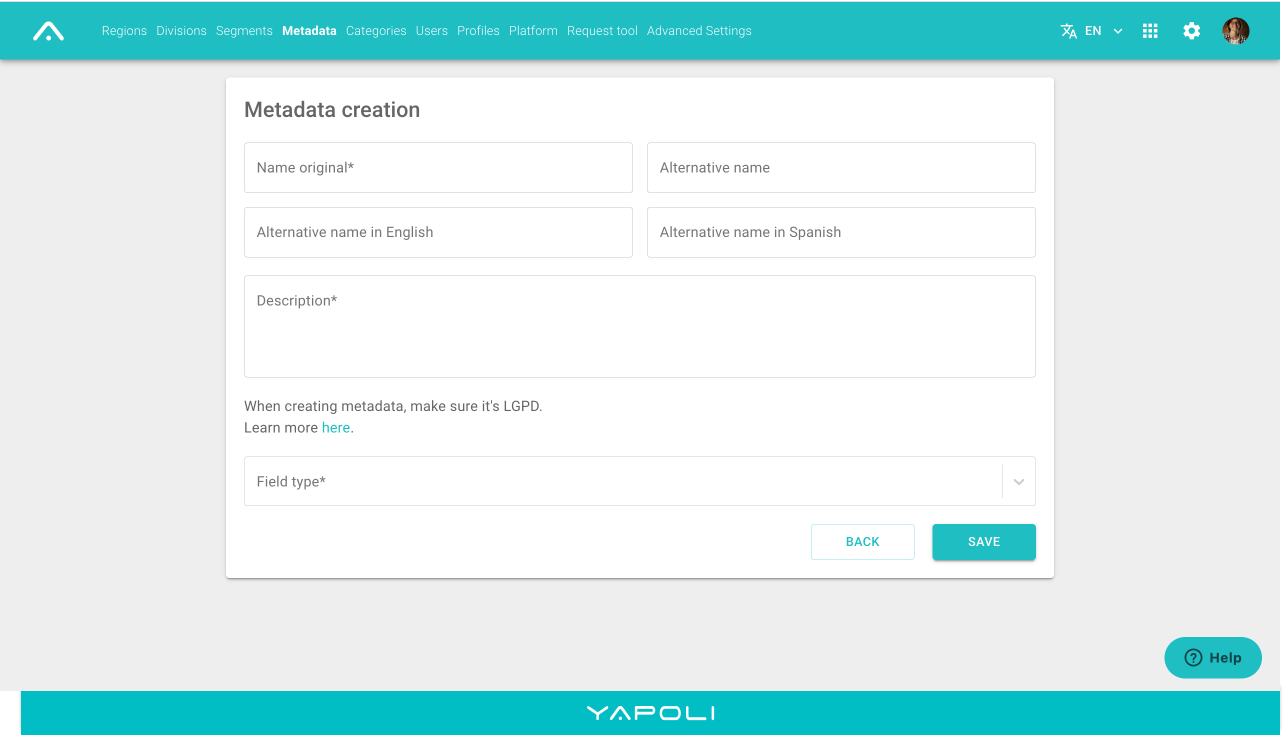
Step 3 - Type the name of the metadata you wish to create in Original Name.
If desired, you can create an alternative name so it can appear in different contexts, which will create its identidy and you can also create the metadata in English and Spanish so it can appear in the filters and the inside page of the item as well;
Step 4 - Type a description so you will know when to use this metadata;
Step 5 - Choose the metadata type:
There are 4 types of Metadata on the Platform, they are:
- Number:
- only metadata with numeric values.
- Date:
- only metadata with values of type mm/dd/yyyy.
- Text:
- metadata with free text field.
- List:
- list of values (numeric, textual, etc.) that become filters in the Item list.
- We do not allow the duplicity when there are various values;
- It is also possible to add a new metadata in the creation page and when editing an item, making it easier to register;
- Define if it will have a unique or multiple values when registering;
We emphasize that, when creating a new metadata, it is very important to verify if it is according the LGPD
Step 6 - Click Save.
NOTE: The field type will define how you refine the search when trying to find a specific item.
Learn more: What is a Metadata?
Comments
0 comments
Article is closed for comments.